
The Data Migration Lifecycle
From a first indicative price to a result proven against the source, the lifecycle runs in nine steps. The first two fix the scope and the price. The next five turn the actual source data into approved rules and generated code, business decisions before technical ones. The last two prove the result and keep every decision traceable.
Phase 1 · Steps 1–2
Fix the Scope and the Price
Two steps that turn numbers you already have into a scope you can count and a price that is fixed before you are locked in.
- Fix the Scope and the Price
- Build It from the Data
- Prove & Govern
Estimate & Discover
An indicative price first, with no commitment. It is derived from numbers you already have: target modules, target tables, target fields, and source systems.
A short, fixed-fee discovery (typically one to three weeks) then confirms those counts and classifies the fields. It runs on an agreed set of source files, the ones that determine volume and complexity, not on every file in the estate. You provide those files as extracts, with the record layout needed to read them, and we profile them in your environment. Discovery tells you how much there is to map and how complex it is; the gaps themselves surface later, in mapping (step 4). Full analysis of every source file is part of the project, after you commit.
You keep the result either way: a scope sheet with the counts, the field classification, and a fixed quote.
If you proceed, the discovery fee is credited against the project price.
What drives the price
- Target fieldsThe largest driver. Each target field is discussed, defined, coded, tested, and verified, and is counted once per use. Fields are classed as constant, direct copy, transformation, derived, or complex, and weighted accordingly; repeated uses with identical logic count less.
- Target modulesEach target module (load unit) is a running unit with its own mapping sessions, test cycles, and migration process.
- Target tables / record typesEach table is a separate unit of migration logic producing records for it, including its relationships to other tables.
- Source systemsEach source system adds access, extraction, and format handling. Source files and fields are captured early at low effort and carry a lower weight.
- Complex fieldsFields whose logic needs other source files, history, or non-trivial derivation. Classified and counted in discovery. The fixed price covers the counted number; a field reclassified later is priced at a published unit rate, not on time and materials. Logic that is a piece of the migration in its own right, for example combining many source cases into one target case, is not a complex field in this sense. Discovery calls it out, and it is priced separately or on time and materials.
Stated in the scope
- Source extracts: you provide the agreed source files as flat extracts (fixed-width or CSV), with the record layout needed to read them, for discovery and for the migration, unless a direct read is agreed.
- Premises: the migration runs in an environment you provide, so the source files stay on your premises. Analysis results (counts, distributions, and example keys, not the source files) may be used by the project team away from that environment, unless you require otherwise.
- Source data quality: cleansing of source data is outside the fixed price or priced separately.
- Decision turnaround: customer decisions within an agreed number of working days.
- History depth: how far back source data is migrated.
- Environments: the number of target environments to load, and who provides them.
- Data volume: affects runtime and rehearsal duration, not the fixed price.
- Production runs: rehearsals, delta runs, and the cutover are scoped separately when the migration itself is defined (see step 7).
- Validation: the items compared and the depth of comparison are agreed during mapping; target extracts are provided by the customer at the agreed granularity and format (see step 8).
- Fix the Scope and the Price
- Build It from the Data
- Prove & Govern
Commit
Committed Scope · Predefined Price
Discovery ends with a fixed scope, price, and schedule. The price changes only if the agreed counts change: the number of modules, tables, fields, or complex fields, at published unit rates. Not because the work turned out harder than we thought. Logic that discovery has set aside as exceptional, such as combining many source cases into one target case, is outside that price and is priced separately or on time and materials.
Phase 2 · Steps 3–7
Build It from the Data
Five steps that start from the actual source data: understand it, map it to the target with business decisions before technical ones, resolve the gaps, generate the migration code, then test, rehearse, and migrate.
- Fix the Scope and the Price
- Build It from the Data
- Prove & Govern
Analyze & Understand
Before migration execution, understand what actually exists:
The data itself is a primary source of evidence.
Principle: data is evidence- Fix the Scope and the Price
- Build It from the Data
- Prove & Govern
Define & Map
Map source reality against the planned target:
Mapping is done in two passes, business first. The business pass maps the meaning of the source to the target model and exposes the gaps that matter most, chiefly functionality the target does not have, while they are still cheap to decide. The technical pass (fields, keys, formats, transformation rules) starts only once those decisions are settled, so it is quicker, issues surface earlier, and technical work is not redone.
Mapping is also a test of the target solution.
- Fix the Scope and the Price
- Build It from the Data
- Prove & Govern
Resolve Gaps and Decisions
- Evidence
- Gap
- Analysis
- Decision
- Approved outcome
Not every gap ends in a transformation rule. A decision may add a target component or a target field, add target logic without changing any field, change a migration rule, or change the migration process itself without touching the rules. Whatever the outcome, it is recorded with the evidence that raised the gap, the analysis, the decision, and who made it.
Migration discoveries should not remain disconnected spreadsheet issues or meeting notes. They feed governed migration knowledge.
Gap Governance- Fix the Scope and the Price
- Build It from the Data
- Prove & Govern
Implement
Business logic should not disappear into code.
- Approved mapping
- Predefined rules
- Generated program
- Execution
Typically the migration is carried by predefined rules captured in the mapping. A code snippet is the exception, used only where a predefined rule cannot express the case. We do not hand-write the migration.
Business requirements and rules are captured formally during business mapping and refined during technical mapping. Where a snippet is needed, it sits at the mapping element it implements. From the mapping, AutoCode generates the complete program for the unit, which compiles and performs the whole migration for that workspace.
Changes are always made in the mapping, never in the generated code. Code can therefore be regenerated whenever required, and wherever the mapping has not changed, the regenerated code is exactly the same.
AutoCode in MCC & Tools- Fix the Scope and the Price
- Build It from the Data
- Prove & Govern
Test, Rehearse & Migrate
- Test
- Rehearse
- Full migration
- Deltas
- Cutover
Three activities, each followed by validation (step 8), each run on the generated code from step 6.
Test
Testing starts from the analysis. For every source field, the analysis records each distinct value and the first occurrences (keys) that carry it. Once mapping is done, we know exactly which source fields each unit uses, so the Sample Extractor builds a test source that contains only, and all, the records needed to cover every distinct value of those fields. The result is a small file with no redundant records, in which every value can be checked individually. Where needed, fields are combined so the sample covers every combination of values that exists in the source.
Rehearse
Rehearsals run the migration on far more data than the test sample: the covering sample plus random records, and when the plan calls for it, the full source. Findings go back into the mapping, never into the code.
Migrate
The migration itself starts with a full run, batched where volumes require it, followed by delta runs that carry new and changed source data forward, so the target reflects the source as it is, not as it was. The final delta is the cutover.
Production rehearsals, delta runs, and the cutover are scoped with you when the migration itself is defined. How many are needed, how deep and wide they go, and how long each run takes depend on your organisation and on how fast the target system loads data in bulk, which ranges from hours to months. None of this is known at commitment, so it is agreed on its own terms rather than guessed into the fixed price.
Sample Extractor in MCC & ToolsPhase 3 · Steps 8–9
Prove & Govern
Two steps that compare what arrived with where it came from, and keep every piece of evidence, every decision, and every version traceable from the first analysis to acceptance.
- Fix the Scope and the Price
- Build It from the Data
- Prove & Govern
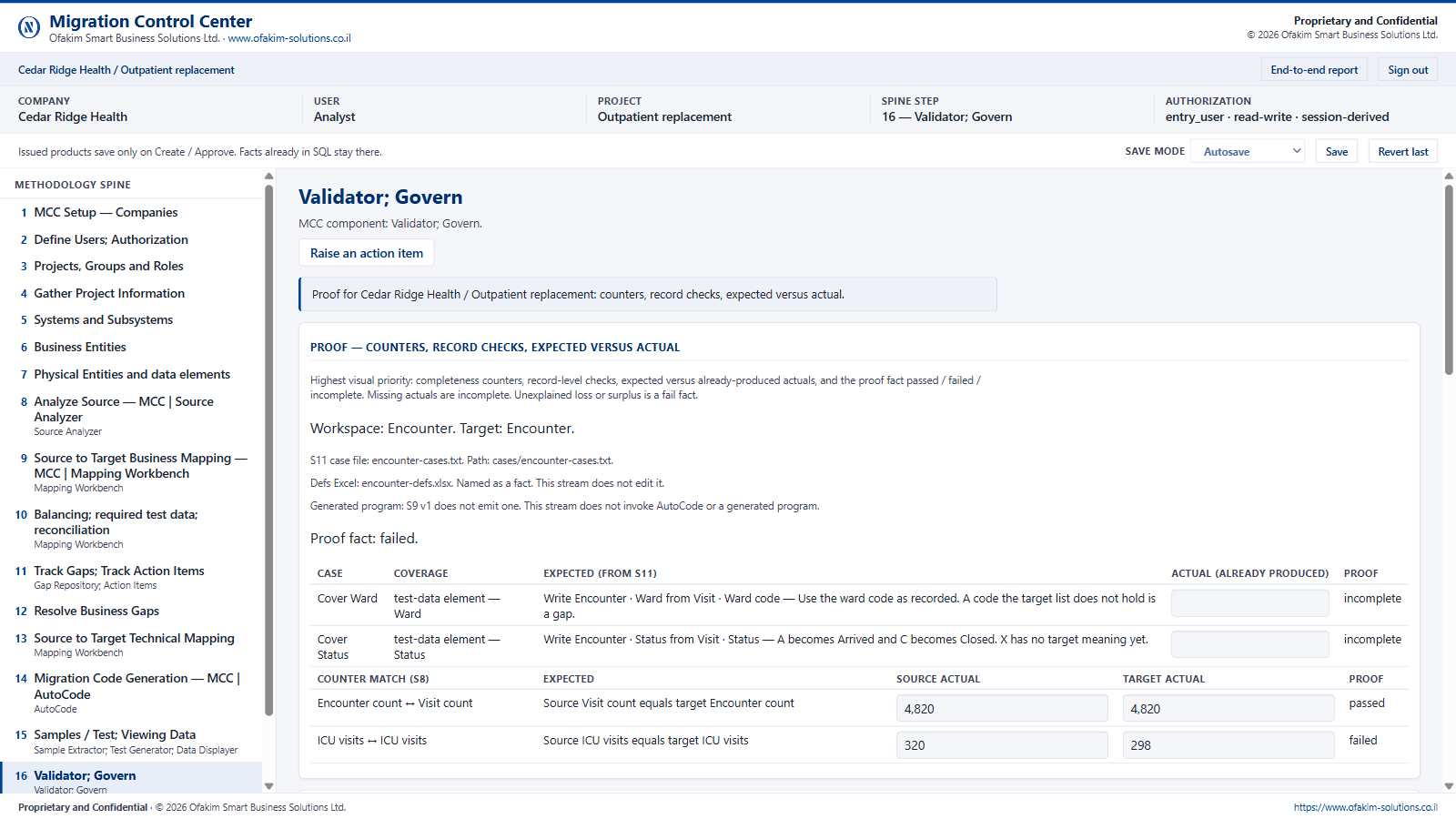
Validate & Prove
Compare what arrived with where it came from.
- Load / technical validation
- Source-target reconciliation
- Validation against approved transformation rules
- Discrepancy identification
- Investigation and resolution
- Acceptance evidence
Not everything is compared. Comparing every value costs more than it proves. You define the items that are critical to verify, and for each we agree whether counts per value are sufficient or a full record-level comparison is required. You provide the extracted target data at the agreed granularity and format; the comparison logic may aggregate values by key on both sides before comparing them, and every discrepancy is explained.
Migration is not complete merely because the load completed successfully.
- Fix the Scope and the Price
- Build It from the Data
- Prove & Govern
Govern Throughout
Governance is not a closing step; it runs under all the others. Every piece of evidence, every gap, every decision and who made it, every rule version, and every generated unit is recorded in MCC as the work proceeds, not reconstructed afterwards.
The result is a migration that can be explained and repeated: any value in the target can be traced back to the source data, the rule that produced it, and the decision behind the rule; any unit can be regenerated from its mapping; and validation evidence is kept with the version it proves.
When to Call Us
Talk to Ofakim when your migration involves one or more of these.
- a major system replacement
- complex or poorly documented legacy data
- several source systems into one target
- regulated, clinical, or financially sensitive information
- delta migration and a constrained cutover window
- source-to-target reconciliation as the acceptance criterion
- business rules that live in the old programs or in how people work, and that have to be written down or they will be applied wrongly or lost
- a merger, acquisition, or consolidation of data
If none of these apply, a conventional ETL project may be all you need, and we will say so.
Planning a Complex Data Migration?
Let's examine the source environment, target objectives, and migration challenge.